
Hizashi — a Chromium browser with a command palette
A personal-project browser for Windows built on Microsoft Edge WebView2. Workspaces, vertical tabs, split view, focus mode, reader mode, an element blocker and more — in a single exe that needs no installer.
Windows 10 / 11 (64-bit) · v1.0.1 · MIT license · about 46 MB
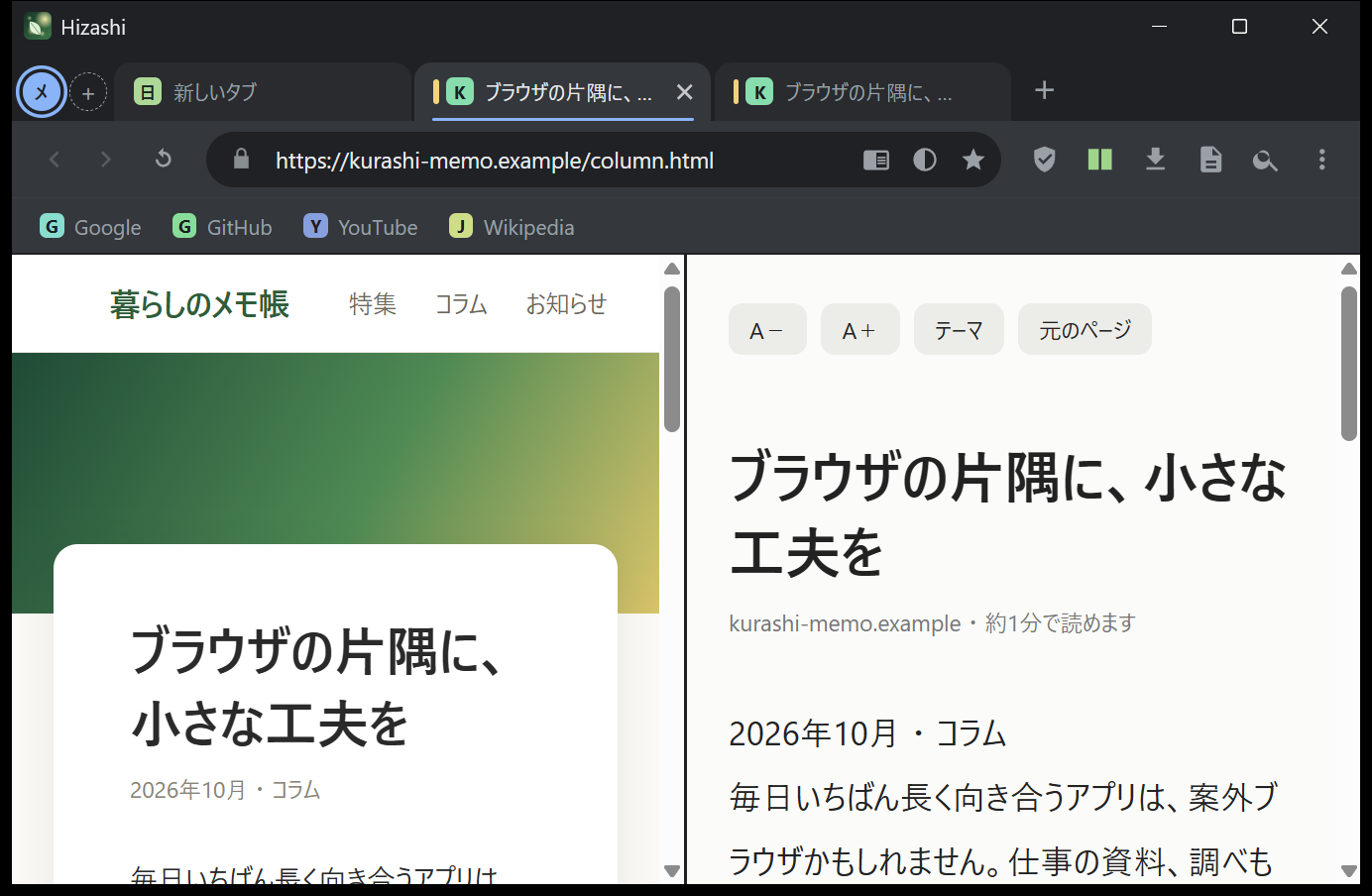
Please note: the interface is Japanese only
Hizashi's menus, panels and settings are currently in Japanese only. Web pages are displayed normally in any language. Translations are welcome — see GitHub Issues.
Features
Command palette
Ctrl+K fuzzy-searches your tabs, bookmarks, history and all 64 commands. It also does quick maths.
Workspaces & vertical tabs
Group tabs into colour-coded workspaces and switch with Alt+1–9. Toggle a collapsible vertical tab sidebar.
Split view
Show two tabs side by side with Alt+S.
Focus mode
Block a configurable list of distracting sites for a set time.
Reader mode
Extracts the article text, with font size, themes and an estimated reading time.
Element blocker
Click any element to hide it; Hizashi remembers it per site.
Privacy helpers
Blocks about 約110 ad/tracker domains, upgrades to HTTPS and strips tracking parameters (utm_*, fbclid, gclid…) from URLs.
And more
Per-site forced dark mode and zoom, full-page screenshots, quick notes, tab sleeping, session restore, picture-in-picture, and 17 address-bar search shortcuts.
Honest limitations
- No browser extensions (WebView2 does not support them).
- No incognito window, no account sync, no import from other browsers.
- Memory use is on par with other Chromium browsers — it is not lightweight. Tab sleeping helps.
- Ad blocking is domain-based and simple; it is not a replacement for uBlock Origin.
- Signing in with a Google account may be rejected as an "insecure browser".
- The exe is not code-signed, so Windows SmartScreen may warn on first launch (click "More info" → "Run anyway"). Verify the file with the SHA-256 on the release page.
- No auto-update: download a new exe and replace the old one. Your data is kept separately.
Privacy
Hizashi itself sends no telemetry and needs no account. Bookmarks, history and notes stay on your PC. Requires the Microsoft Edge WebView2 Runtime (included in Windows 11 and recent Windows 10). The source is MIT-licensed on GitHub.
Android version (beta)
There is also an Android version (Android 10+, about 5 MB, Japanese UI only). It is a beta: it has not been tested on many devices and has fewer features than the Windows version (no workspaces, vertical tabs, split view, notes or screenshots). Download the APK from GitHub Releases — see the README for install steps.
Try Hizashi
Free, open source (MIT), Windows 10 / 11.